PII Examples: 50+ Types of Personal Identifiable Information
February 9, 2026
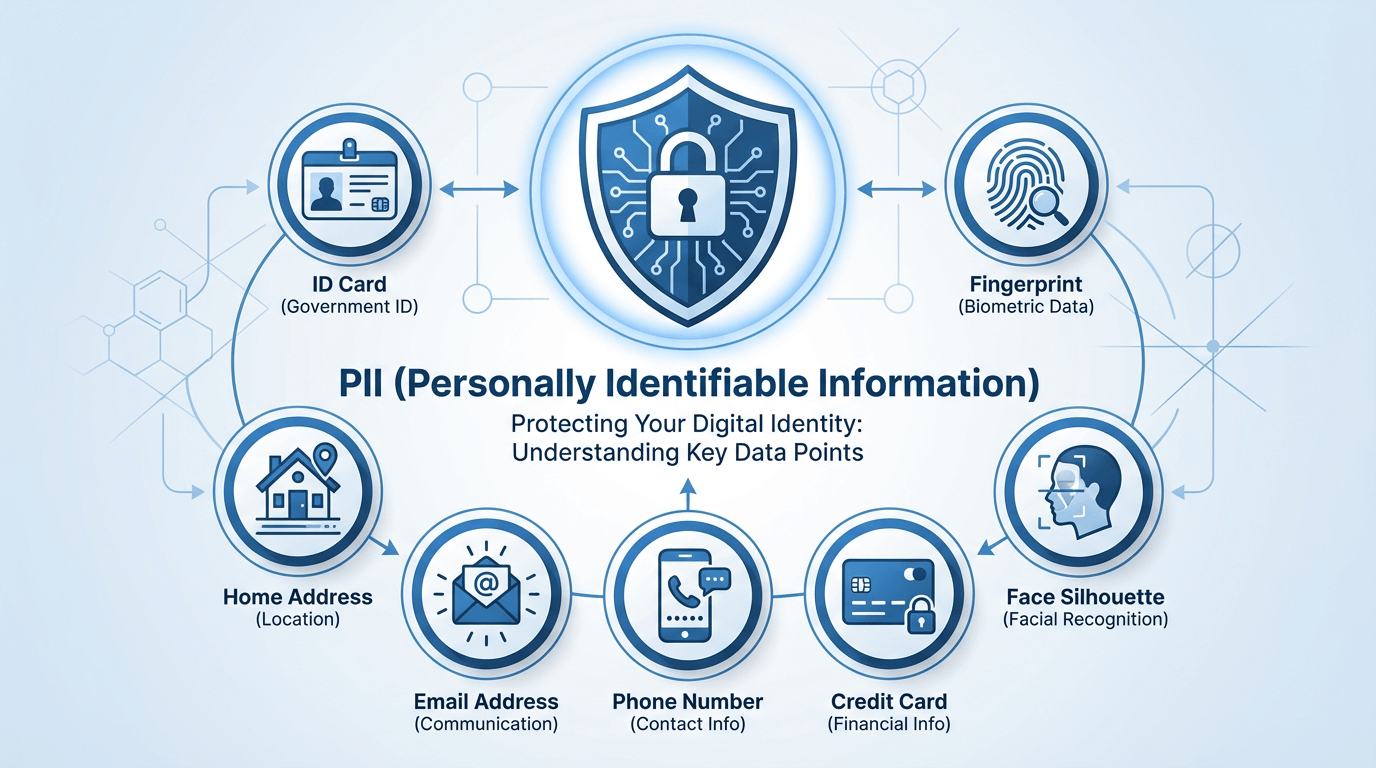
Personally Identifiable Information (PII) is any data that can identify a specific individual, either on its own or when combined with other information. The average data breach now costs organizations $4.45 million, with regulatory fines reaching up to €20 million under GDPR. Understanding what counts as PII is the first step toward protecting it.
This comprehensive guide lists 50+ examples of PII organized by category, explains the key regulatory definitions under GDPR, CCPA, and HIPAA, and provides practical guidance on identifying and redacting PII from images and documents.
What is PII? Definition and Scope
NIST Definition
The National Institute of Standards and Technology (NIST) defines PII as:
"Any information about an individual maintained by an agency, including (1) any information that can be used to distinguish or trace an individual's identity, such as name, social security number, date and place of birth, mother's maiden name, or biometric records; and (2) any other information that is linked or linkable to an individual, such as medical, educational, financial, and employment information."
GDPR Definition (Personal Data)
Under GDPR, the equivalent term is "personal data," defined as:
"Any information relating to an identified or identifiable natural person ('data subject'); an identifiable natural person is one who can be identified, directly or indirectly, in particular by reference to an identifier."
The GDPR definition is notably broad, encompassing any information that could be combined with other data to identify someone — even if the organization holding it cannot make the identification themselves.
Context-Dependent Nature
A crucial point about PII is that context matters. Some data elements are always PII (like Social Security numbers), while others become PII only in combination. For example:
- "John" alone is not PII — too common to identify anyone
- "John Smith" may or may not be PII depending on context
- "John Smith, 123 Main St, Boston" is definitively PII
- "Male, age 45, ZIP 02101" could be PII if the combination uniquely identifies someone in a small dataset
Direct Identifiers (20+ Examples)
Direct identifiers can uniquely identify an individual on their own, without needing additional context or data:
| # | PII Type | Description |
|---|---|---|
| 1 | Full Name | First and last name (sometimes middle name) |
| 2 | Social Security Number (SSN) | 9-digit US identifier (e.g., 123-45-6789) |
| 3 | Driver's License Number | State-issued identification number |
| 4 | Passport Number | Government-issued travel document ID |
| 5 | Email Address | Personal or work email (e.g., john.smith@example.com) |
| 6 | Phone Number | Mobile or landline number |
| 7 | Home Address | Full street address with city/state/ZIP |
| 8 | License Plate Number | Vehicle registration number |
| 9 | Face Photograph | Any image showing identifiable facial features |
| 10 | Fingerprint | Biometric fingerprint data |
| 11 | Retina/Iris Scan | Eye biometric data |
| 12 | Voice Recording | Identifiable voice sample |
| 13 | DNA Profile | Genetic sequence data |
| 14 | National ID Number | Government-issued ID (non-US countries) |
| 15 | Taxpayer ID Number | ITIN, EIN, or equivalent tax identifiers |
| 16 | Bank Account Number | Checking/savings account number |
| 17 | Credit Card Number | Full payment card number (PAN) |
| 18 | Health Insurance ID | Insurance member/policy number |
| 19 | Medical Record Number | Healthcare provider patient ID |
| 20 | Vehicle Identification Number (VIN) | 17-character vehicle serial number |
| 21 | Device Serial Number | IMEI, MAC address, or device identifier |
| 22 | Digital Signature | Handwritten or electronic signature |
Indirect Identifiers (15+ Examples)
Indirect identifiers cannot identify someone alone, but can do so when combined with other data. These are often called "quasi-identifiers" in privacy research:
| # | PII Type | Why It's Risky |
|---|---|---|
| 23 | Date of Birth | Combined with ZIP code, identifies 87% of US population |
| 24 | Place of Birth | Narrows down identity significantly |
| 25 | Gender | Key demographic for re-identification |
| 26 | Race/Ethnicity | Demographic identifier; also sensitive category |
| 27 | ZIP Code | 5-digit ZIP alone can narrow to small population |
| 28 | Job Title / Employer | "CEO of Company X" is often uniquely identifying |
| 29 | Education History | School + graduation year narrows significantly |
| 30 | Physical Characteristics | Height, weight, tattoos, scars |
| 31 | Age | Combined with location narrows population |
| 32 | Marital Status | Demographic characteristic |
| 33 | IP Address | Can be traced to location and subscriber |
| 34 | Cookie IDs | Track behavior across websites |
| 35 | Geolocation Data | GPS coordinates can reveal home/work addresses |
| 36 | Browsing History | Pattern analysis can identify individuals |
| 37 | Purchase History | Transaction patterns are often unique |
The Re-identification Risk: Research has shown that just 3 indirect identifiers — date of birth, gender, and 5-digit ZIP code — can uniquely identify 87% of the US population. This is why HIPAA and GDPR require careful handling of even seemingly innocuous data points.
Sensitive PII (15+ Examples)
Sensitive PII requires heightened protection because its exposure could cause significant harm including discrimination, identity theft, financial loss, or reputational damage:
| # | Sensitive PII Type | Potential Harm |
|---|---|---|
| 38 | SSN / Tax ID | Identity theft, fraudulent accounts |
| 39 | Biometric Data | Permanent compromise — cannot be changed |
| 40 | Medical Records | Discrimination, insurance denial |
| 41 | Financial Account Numbers | Direct financial theft |
| 42 | Criminal History | Employment discrimination, reputational harm |
| 43 | Sexual Orientation | Discrimination, harassment |
| 44 | Religious Beliefs | Discrimination, targeted harassment |
| 45 | Political Affiliation | Employment/social consequences |
| 46 | Genetic Information | Discrimination, family implications |
| 47 | Union Membership | Employment retaliation |
| 48 | Immigration Status | Legal consequences, deportation risk |
| 49 | Login Credentials | Account takeover, identity theft |
| 50 | Mental Health Records | Stigma, employment discrimination |
| 51 | Substance Abuse History | Stigma, insurance denial |
| 52 | Child Information | Special protection under COPPA and other laws |
PII in Images: What to Watch For
Images are often overlooked sources of PII exposure. Photographs, screenshots, scanned documents, and even casual snapshots frequently contain identifiable information:
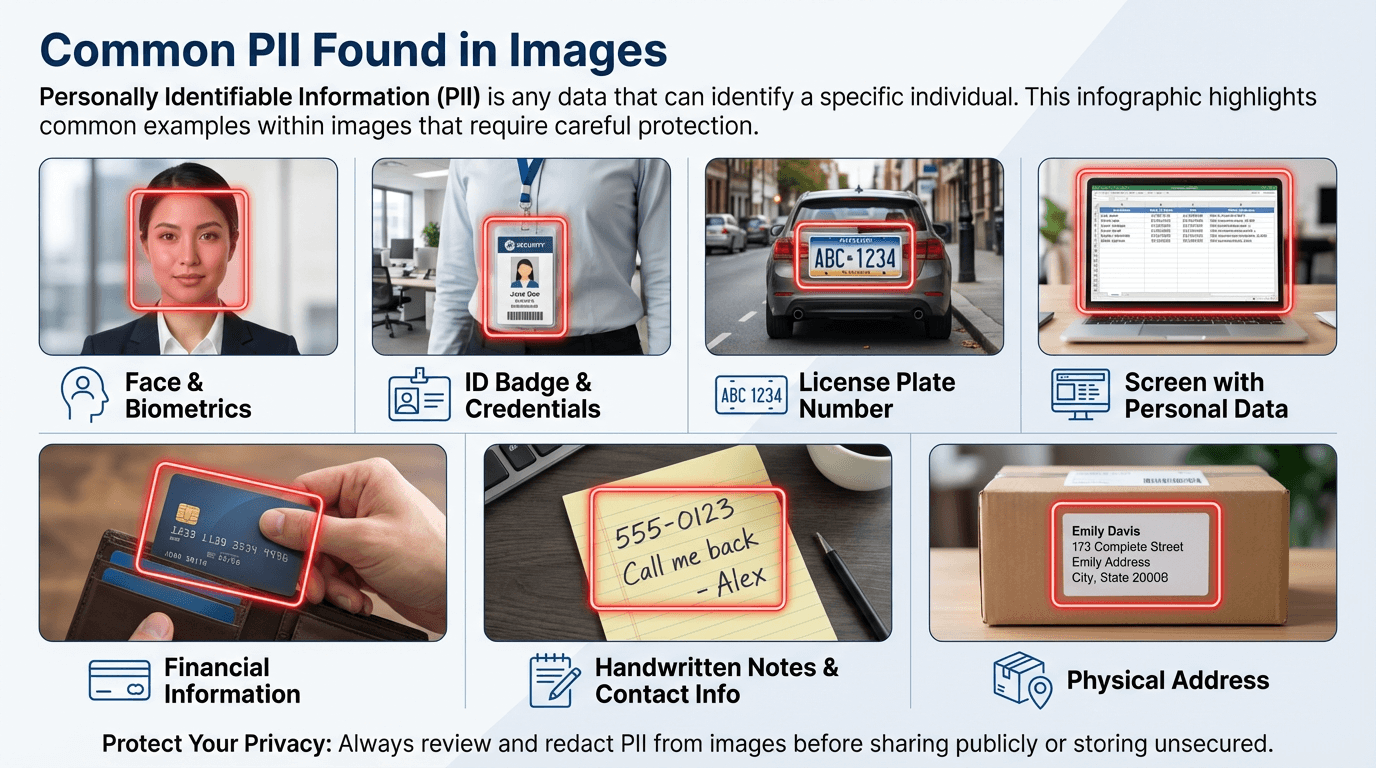
Common PII Found in Images
- Visible ID documents: Driver's licenses, passports, employee badges visible in photos
- Name badges: Conference badges, work IDs, visitor passes
- Credit/debit cards: Cards visible on desks, in wallets, or being held
- Computer screens: Email addresses, passwords, account numbers visible in screenshots
- Handwritten notes: Phone numbers, addresses, names on whiteboards or sticky notes
- License plates: Vehicle plates in parking lots, driveways, street scenes
- Faces: Identifiable facial features count as biometric PII
- Mail/packages: Shipping labels with names and addresses
- Receipts: Partial card numbers, transaction details
- Street signs/addresses: Visible house numbers, street names
Image metadata is also PII: Beyond visible content, images often contain EXIF metadata with GPS coordinates (revealing exact location), timestamps, device model, and camera serial numbers. This hidden data can expose where and when a photo was taken.
PII vs. PHI: Key Differences
PII and PHI are related but distinct concepts. Understanding the difference is crucial for compliance:
| Aspect | PII | PHI |
|---|---|---|
| Full Name | Personally Identifiable Information | Protected Health Information |
| Scope | Any identifying data | Health data linked to an individual |
| Governing Law | GDPR, CCPA, various laws | HIPAA (US healthcare) |
| Who Must Comply | Most organizations handling personal data | HIPAA covered entities (healthcare providers, insurers) |
| Relationship | Broader category; includes non-health data | Subset of PII; always involves health context |
Key insight: All PHI is PII, but not all PII is PHI. A patient's name combined with their diagnosis is PHI. The same name combined with their purchase history is PII but not PHI.
For a deep dive into PHI and the 18 HIPAA identifiers, see our related guide: PHI vs PII: Understanding the Key Differences for Compliance
Legal Requirements by Region
GDPR (Europe)
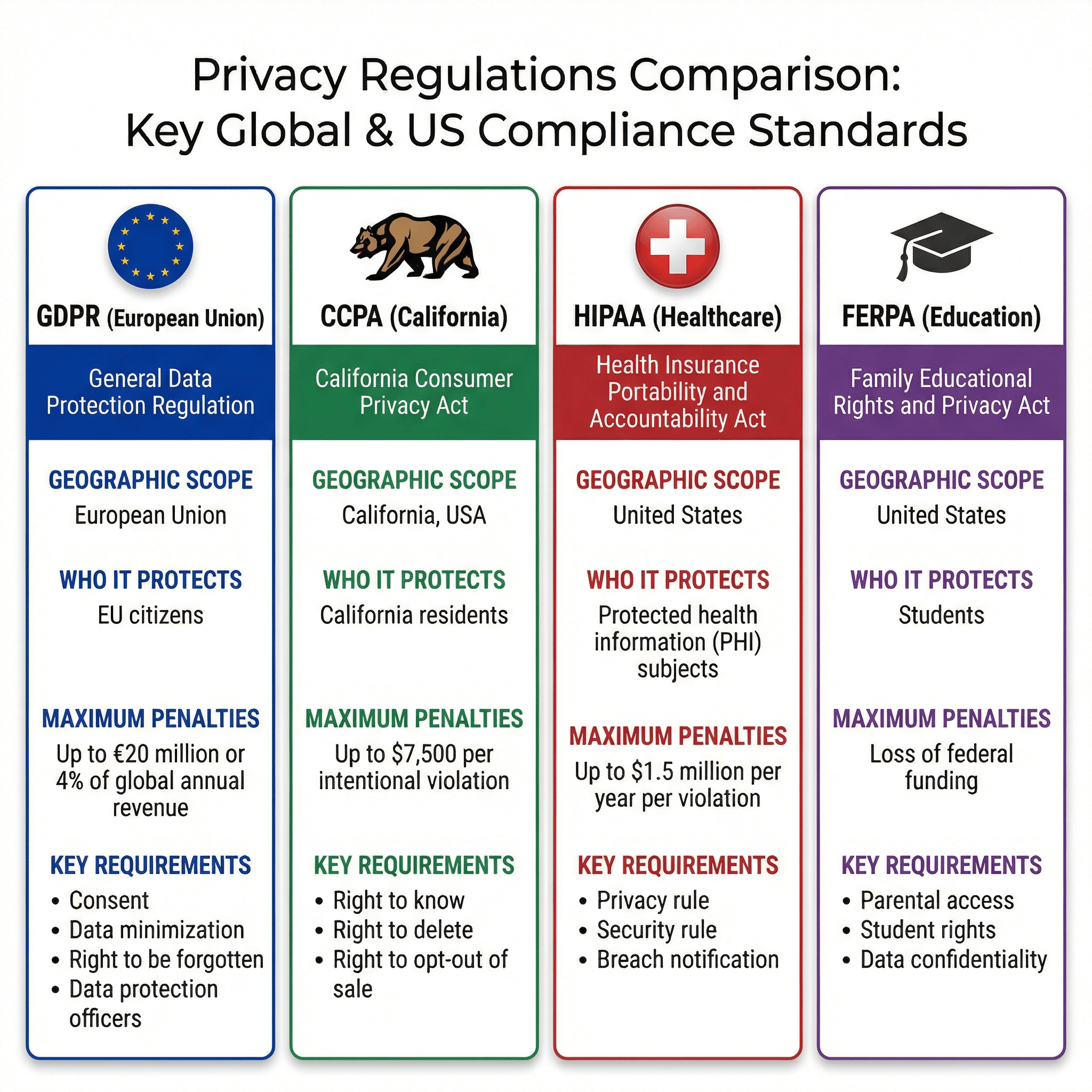
The General Data Protection Regulation applies to any organization processing personal data of EU residents, regardless of where the organization is located.
- Penalties: Up to €20 million or 4% of global annual revenue
- Key requirement: Lawful basis for processing; data minimization
- Special categories: Racial/ethnic origin, biometric data, health data require explicit consent
CCPA/CPRA (California)
The California Consumer Privacy Act (enhanced by CPRA) gives California residents rights over their personal information.
- Penalties: $2,500 per violation; $7,500 per intentional violation
- Key requirement: Right to know, delete, and opt-out of data sales
- Sensitive categories: SSN, precise geolocation, racial/ethnic origin, biometrics
HIPAA (US Healthcare)
HIPAA protects health information handled by covered entities (healthcare providers, health plans, healthcare clearinghouses).
- Penalties: Up to $1.5 million per year per violation category
- Key requirement: De-identification of PHI using Safe Harbor or Expert Determination
- 18 identifiers: Names, dates, geographic data, phone/fax, email, SSN, and more
FERPA (US Education)
The Family Educational Rights and Privacy Act protects student education records.
- Penalties: Loss of federal funding
- Key requirement: Parental consent for disclosure; student rights after age 18
- Protected information: Grades, transcripts, disciplinary records, family information
How to Redact PII from Images with PixBlur
Manually identifying and redacting PII in images is time-consuming and error-prone. PixBlur's AI-powered redaction automatically detects and masks sensitive information:
What PixBlur AI Automatically Detects
- Personal names — First and last names in any context
- Dates of birth — DOB in various formats
- Phone numbers — Mobile, landline, fax numbers
- Email addresses — Personal and work emails
- Physical addresses — Street addresses, cities, ZIP codes
- ID numbers / SSNs — Social Security numbers, national IDs
- Credit card numbers — Full or partial card numbers
- License plates — Vehicle registration numbers
- Medical/financial information — Account numbers, health data
- Faces — Identifiable facial features with >98% accuracy
Multi-language support: PixBlur AI supports 100+ languages for OCR detection, making it suitable for international documents.
Redaction Workflow
- Go to the PixBlur editor
- Upload your image — JPEG, PNG, or WebP up to 30 MB
- Click "Run AI Edit" — AI scans for faces and sensitive text
- Review detected PII — Masks appear on all identified sensitive areas
- Adjust as needed — Add, remove, or modify masks using manual tools
- Export — Download in original quality with EXIF metadata removed
For large datasets: PixBlur's batch processing lets you redact up to 10 images per batch with AI detection, then review each image before downloading as a ZIP (desktop only).
Checklist: PII Redaction Best Practices
Use this checklist before sharing any document or image that might contain PII:
Pre-Sharing PII Checklist
- ☐Scan for direct identifiers: names, SSNs, IDs, email, phone, address
- ☐Check for indirect identifiers: DOB+ZIP+gender combinations
- ☐Identify sensitive categories: health, financial, biometric data
- ☐For images: check for visible faces, ID badges, license plates, screens
- ☐Strip EXIF metadata (GPS, device info, timestamps)
- ☐Use proper redaction tools — not just black boxes in image editors
- ☐Verify redaction is permanent — test by selecting/copying hidden areas
- ☐Have a second person review before sharing
Frequently Asked Questions
What is PII (Personally Identifiable Information)?
PII is any information that can be used to identify, contact, or locate an individual, either alone or combined with other data. This includes direct identifiers like names and Social Security numbers, as well as indirect identifiers like ZIP codes and birth dates that can identify someone when combined.
What is the difference between PII and PHI?
PII (Personally Identifiable Information) is a broad term covering any data that can identify an individual. PHI (Protected Health Information) is a HIPAA-specific term that refers to health information linked to an individual. PHI is always PII, but PII is not always PHI — PHI specifically requires a healthcare context.
What are examples of sensitive PII?
Sensitive PII includes Social Security numbers, financial account numbers, biometric data (fingerprints, facial recognition), medical records, criminal history, sexual orientation, genetic information, and immigration status. These require stronger protection due to the potential for significant harm if disclosed.
Can images contain PII?
Yes. Images frequently contain PII including visible faces (biometric data), ID documents, name badges, license plates, handwritten notes with personal details, credit cards, computer screens showing accounts, and address signs. All of these should be redacted before sharing images publicly.
What regulations require PII protection?
Major regulations requiring PII protection include GDPR (Europe), CCPA/CPRA (California), HIPAA (US healthcare), FERPA (US education), GLBA (US financial), and various state privacy laws. Non-compliance can result in significant fines — up to €20 million or 4% of global revenue under GDPR.
Why PixBlur for PII Redaction?
- ✅ AI-Powered Detection — Automatically finds faces, names, DOB, phone numbers, email addresses, physical addresses, license plates, SSNs, and credit card numbers with >98% accuracy
- ✅ Review Before Export — AI results are editable; add or remove masks before downloading
- ✅ 4 Redaction Styles — Choose blur, pixelate, emoji overlay, or solid color for face and text masks
- ✅ Batch Processing — Redact up to 10 images per batch for large datasets; download as ZIP
- ✅ 100+ Languages — Multi-language OCR support for international documents
- ✅ Images Never Stored — Processed temporarily in memory; automatically discarded after redaction
- ✅ Privacy-First Manual Mode — 100% local processing, no uploads, completely free
- ✅ Free PDF Converter — Convert PDF to images for secure redaction, then convert back. 100% in browser.
- ✅ EXIF Metadata Removed — GPS, camera info, timestamps automatically stripped from exports
Manual editor requires no login. AI features give new users 5 free credits to try. Batch processing and PDF Converter require desktop browser.