PHI vs PII: Understanding the Key Differences for Compliance
February 9, 2026
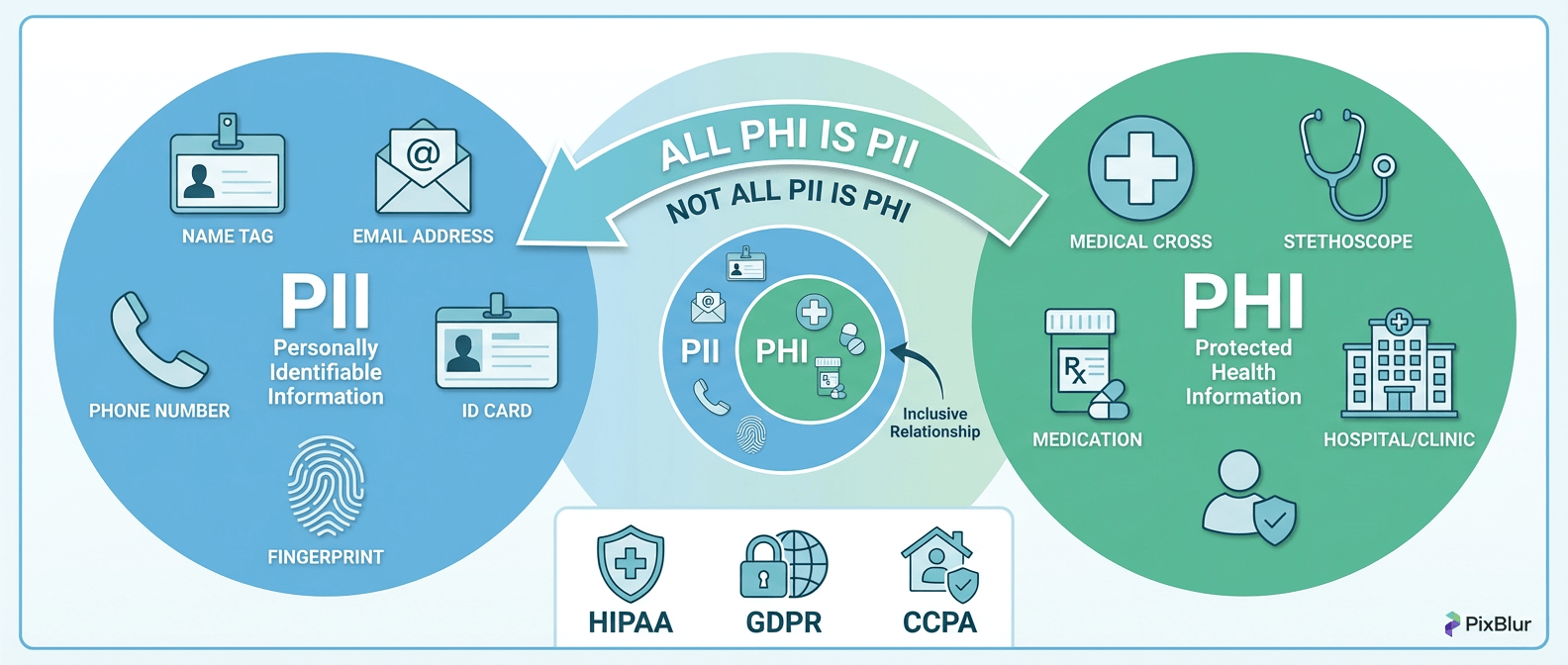
PHI (Protected Health Information) and PII (Personally Identifiable Information) are often confused, even by compliance professionals. Both involve sensitive personal data, but they fall under different regulations with distinct requirements. Getting them wrong can mean HIPAA fines up to $1.5 million per violation category — or failing audits that could have been avoided.
This guide clarifies the PHI vs PII distinction, explains the 18 HIPAA identifiers, shows when these categories overlap, and provides practical guidance for redacting PHI from images and documents.
PII Defined: Scope and Examples
Personally Identifiable Information (PII) is any data that can identify an individual, either alone or when combined with other information. This broad definition encompasses many categories of data.
Key Characteristics of PII
- Direct identifiers: Data that uniquely identifies someone alone (SSN, driver's license, email)
- Indirect identifiers: Data that identifies when combined (ZIP code + DOB + gender)
- Governed by multiple laws: GDPR, CCPA, FERPA, and various state regulations
- Context-dependent: Some data becomes PII only in certain contexts
Common PII Examples
For a comprehensive list of 50+ PII types, see our detailed guide: PII Examples: 50+ Types of Personal Identifiable Information
PHI Defined: HIPAA-Specific Rules
Protected Health Information (PHI) is individually identifiable health information created, received, maintained, or transmitted by a HIPAA covered entity or business associate.
What Makes Data "Protected"
For information to qualify as PHI under HIPAA, it must meet three criteria:
- Health information: Relates to past, present, or future physical/mental health, healthcare provision, or payment for healthcare
- Individually identifiable: Can identify or reasonably be used to identify the individual
- Healthcare context: Created or received by a covered entity (healthcare provider, health plan, or healthcare clearinghouse)
Who Must Comply with HIPAA
- Covered entities: Healthcare providers, health plans, healthcare clearinghouses
- Business associates: Third parties that handle PHI on behalf of covered entities (IT vendors, billing companies, cloud storage providers)
Important: If you're not a covered entity or business associate, HIPAA doesn't apply to you — even if you handle health-related data. However, other laws like GDPR or state privacy laws may still apply.
PHI vs PII: Side-by-Side Comparison
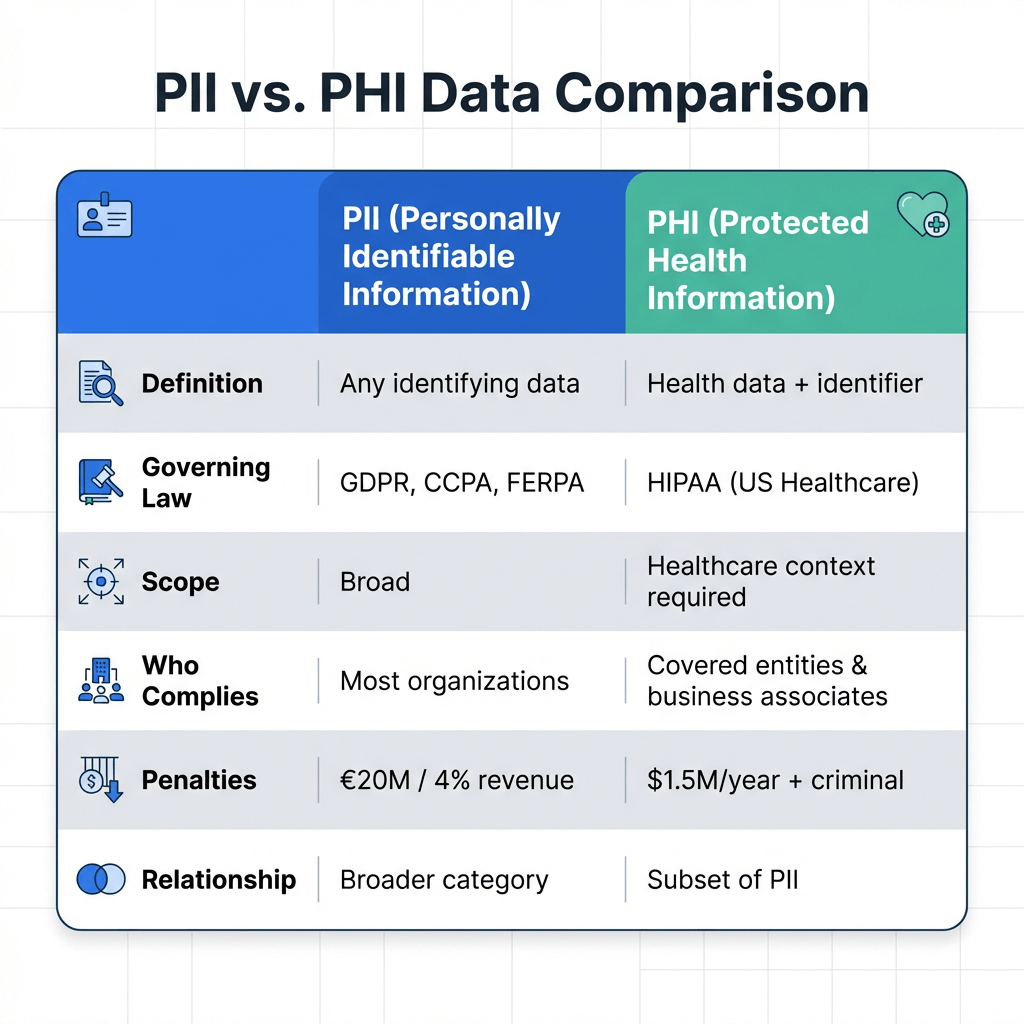
| Aspect | PII | PHI |
|---|---|---|
| Full Name | Personally Identifiable Information | Protected Health Information |
| Definition | Any data that can identify an individual | Health data linked to an identifiable individual |
| Governing Law | GDPR, CCPA, FERPA, state laws | HIPAA (US healthcare) |
| Scope | Broad — any identifying data | Narrow — healthcare context required |
| Who Complies | Most organizations handling personal data | HIPAA covered entities and business associates |
| Maximum Penalty | €20M or 4% revenue (GDPR) | $1.5M/year per violation category + criminal |
| Relationship | Broader category; includes non-health data | Subset of PII; always involves health context |
Key Insight
All PHI is PII, but not all PII is PHI. A patient's name combined with their diagnosis is PHI. The same name combined with their purchase history is PII but not PHI — there's no health information involved.
When PHI is Also PII: Overlap Scenarios
Understanding when these categories overlap is critical for compliance. Here are common scenarios where data qualifies as both PHI and PII:
Medical Records with Patient Names
Any medical record containing a patient identifier is simultaneously PHI (health info + identifier) and PII (the identifier itself). Examples:
- Lab results with patient name and DOB
- Prescription records with patient address
- Diagnostic images with patient identifiers
- Clinical notes referencing the patient
Insurance Information
Health insurance data combines multiple identifiers:
- Insurance ID numbers (identifier + healthcare context = PHI)
- Claims data showing treatments received
- Explanation of Benefits (EOB) documents
- Prior authorization records
Appointment Records
Even scheduling information can be PHI:
- "John Smith, oncology appointment 3/15" — reveals health condition
- "Patient #12345, psychiatry follow-up" — mental health indicator
- Appointment reminders with clinic names that reveal conditions
The 18 HIPAA Identifiers Explained
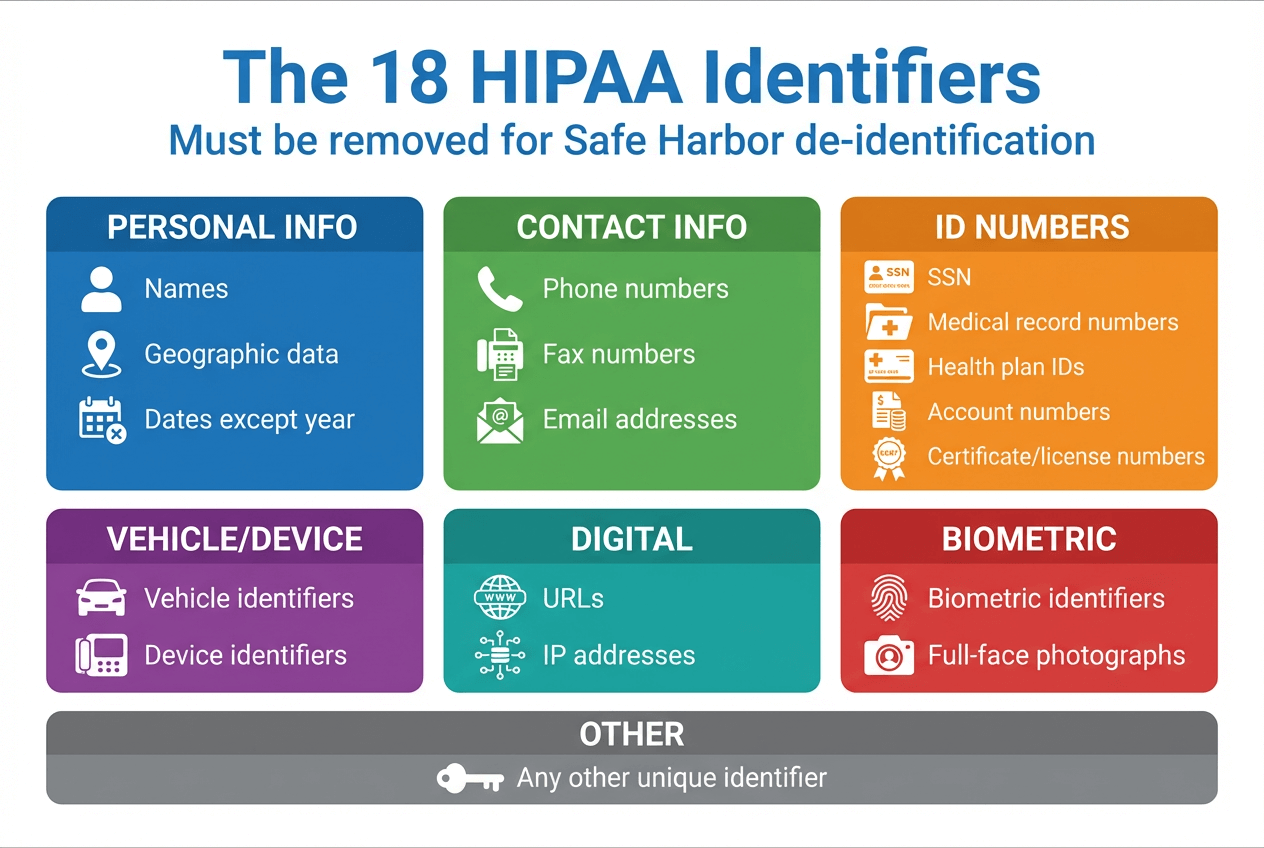
HIPAA specifies 18 types of identifiers that must be removed to de-identify PHI under the Safe Harbor method. These are the elements that, when combined with health information, create protected data:
| # | Identifier | Description / Notes |
|---|---|---|
| 1 | Names | Full name, maiden name, aliases, initials |
| 2 | Geographic Data | Any location smaller than state; street, city, ZIP (first 3 digits OK if population >20,000) |
| 3 | Dates (except year) | Birth date, admission date, discharge date, death date; ages over 89 must be aggregated |
| 4 | Phone Numbers | All telephone numbers |
| 5 | Fax Numbers | All fax numbers |
| 6 | Email Addresses | Personal and work email |
| 7 | Social Security Numbers | Full or partial SSN |
| 8 | Medical Record Numbers | Healthcare provider patient IDs |
| 9 | Health Plan Beneficiary Numbers | Insurance member/subscriber IDs |
| 10 | Account Numbers | Financial account numbers |
| 11 | Certificate/License Numbers | Driver's license, professional licenses |
| 12 | Vehicle Identifiers | License plates, VINs, serial numbers |
| 13 | Device Identifiers | Medical device serial numbers, implant IDs |
| 14 | Web URLs | Personal URLs that could identify patients |
| 15 | IP Addresses | Internet protocol addresses |
| 16 | Biometric Identifiers | Fingerprints, voiceprints, retina scans |
| 17 | Full-Face Photographs | Any comparable image showing identifiable features |
| 18 | Any Other Unique Identifier | Any number, code, or characteristic that could identify an individual |
Redaction Requirements for PHI in Images
HIPAA provides two methods for de-identifying PHI. For image redaction, the Safe Harbor method is most commonly used:
Safe Harbor Method
Remove or redact all 18 HIPAA identifiers, and ensure the covered entity has no actual knowledge that the remaining information could identify an individual.
- Pros: Clear, prescriptive checklist; doesn't require statistical expertise
- Cons: May remove more data than necessary; can limit research utility
- Best for: Most healthcare organizations; standard compliance approach
Expert Determination Method
A qualified statistical expert determines that the risk of identifying any individual is "very small" and documents their methods and results.
- Pros: Can retain more data for research; flexible approach
- Cons: Requires expert analysis; more expensive; must be documented
- Best for: Research institutions; complex datasets
How Healthcare Organizations Use Image Redaction
Healthcare organizations handle images containing PHI in many contexts. Here's where redaction is typically required:
Patient Intake Forms
Scanned intake forms contain multiple HIPAA identifiers: names, DOB, SSN, addresses, phone numbers. Before sharing for training, audits, or research, these must be de-identified.
Medical Imaging
X-rays, MRIs, CT scans, and other diagnostic images often contain patient identifiers burned into the image or embedded in metadata. For research publications or teaching materials, this information must be removed.
Insurance Documents
EOBs, claims forms, and authorization documents contain beneficiary numbers, treatment codes, and provider information. These require redaction before any non-treatment use.
Research Publications
Clinical images included in papers, presentations, or case studies must have all patient identifiers removed. This includes visible text in images, patient faces, and any unique characteristics that could identify the individual.
Redacting PHI in Medical Images with PixBlur AI
PixBlur's AI-powered redaction automatically detects PHI in medical images, helping healthcare organizations achieve HIPAA compliance efficiently:
What PixBlur AI Detects
- Personal names — First, last, and full names in any document context
- Dates of birth — DOB in various formats
- Phone numbers — Mobile, landline, fax numbers
- Email addresses — Personal and work email
- Physical addresses — Street addresses, cities, ZIP codes
- ID numbers / SSNs — Social Security numbers, insurance IDs, account numbers
- Credit card numbers — Full or partial card numbers
- License plates — Vehicle registration numbers
- Medical/financial information — Sensitive data in healthcare and financial contexts
- Faces — Automatic face detection with >98% accuracy
Multi-language support: PixBlur AI supports 100+ languages, making it suitable for international healthcare organizations processing documents in multiple languages.
HIPAA-Compliant Workflow
- Upload medical images — JPEG, PNG, WebP (max 30 MB), or use PDF Converter for scanned documents
- AI scans for PHI — Automatically detects faces, names, phone numbers, addresses, ID numbers, and other sensitive text
- Review before export — Critical for compliance: verify all PHI is masked, add manual redactions for any missed items
- Choose redaction style — Select from blur, pixelate, emoji overlay, or solid color for faces
- Export de-identified image — EXIF metadata automatically removed; download in original quality
Privacy note: Images are processed temporarily and never stored on our servers, the original image data is discarded immediately after processing.
Try the Manual & AI Editor → for single-image redaction with full manual control.
Batch Processing for Large Datasets
For healthcare organizations processing hundreds or thousands of images, PixBlur's batch mode processes 10 images per batch with AI detection. Each image can be reviewed and edited individually before downloading the batch as a ZIP file.
Cost: 1 credit per image for AI redaction. Manual editor and PDF Converter are completely free.
Try Batch Processing → for bulk medical image de-identification (desktop only).
Frequently Asked Questions
What is the difference between PHI and PII?
PII (Personally Identifiable Information) is any data that can identify an individual. PHI (Protected Health Information) is health information linked to an individual under HIPAA. The key difference: PHI requires a healthcare context. All PHI is PII, but not all PII is PHI.
What are the 18 HIPAA identifiers?
The 18 HIPAA identifiers are: names, geographic data smaller than state, dates (except year), phone numbers, fax numbers, email addresses, Social Security numbers, medical record numbers, health plan beneficiary numbers, account numbers, certificate/license numbers, vehicle identifiers, device identifiers, URLs, IP addresses, biometric identifiers, full-face photographs, and any other unique identifying number.
Is a patient name alone considered PHI?
A patient name alone is PII, but it becomes PHI when linked to health information. For example, "John Smith" is PII. "John Smith has diabetes" is PHI because it combines an identifier with health data in a healthcare context.
What is the Safe Harbor method for de-identification?
The Safe Harbor method is a HIPAA de-identification standard that requires removing all 18 specified identifiers from health information. Once removed, the data is no longer considered PHI and falls outside HIPAA regulations. This is the most commonly used de-identification approach.
What are the penalties for PHI violations?
HIPAA penalties range from $100 to $50,000 per violation, with annual maximums up to $1.5 million per violation category. Criminal penalties can include fines up to $250,000 and imprisonment up to 10 years for knowing misuse of PHI.
Why PixBlur for PHI Redaction?
- ✅ AI-Powered Detection — Automatically finds faces, names, phone numbers, email addresses, physical addresses, ID numbers, and other sensitive text with >98% accuracy
- ✅ Review Before Export — Critical for compliance: AI results are editable; verify and adjust masks before downloading
- ✅ 4 Redaction Styles — Choose blur, pixelate, emoji overlay, or solid color for face and text masks
- ✅ Batch Processing — Redact up to 10 images per batch for large datasets; download as ZIP
- ✅ 100+ Languages — Multi-language OCR support for international healthcare documents
- ✅ Images Never Stored — Processed temporarily in memory; automatically discarded after redaction
- ✅ Privacy-First Manual Mode — 100% local processing, no uploads, completely free
- ✅ Free PDF Converter — Convert scanned documents to images for redaction, then convert back. 100% in browser.
- ✅ EXIF Metadata Removed — GPS, device info, timestamps automatically stripped from exports
Manual editor requires no login. AI features give new users 5 free credits to try. Batch processing and PDF Converter require desktop browser.